Icons Protocol
The Controller Deck exposes a custom USB interface used to update the content of the customizable buttons icons and fader labels:
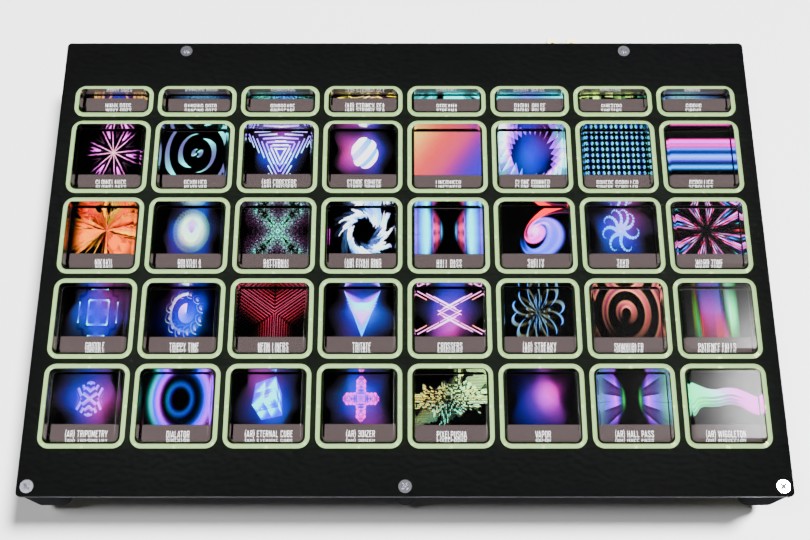
The TouchDeck grid screen: exposed as one big screen behind the 8x5 grid of buttons.
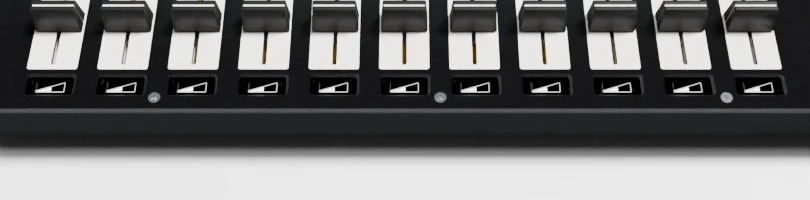
The Fader label screens: (one per fader channel, 11 in total).
USB device identification
The bulk interface is exposed on the main TouchDeck USB
device:
Field |
Value |
|---|---|
bcdUSB |
2.00 High Speed |
Vendor ID |
|
Product ID |
|
iManufacturer |
LambdaConcept |
iProduct |
TouchDeck |
Note
The Controller Deck’s USB audio interface
enumerates separately, as PureAudio, PID 0x1235 (see Pure Audio Device).
USB Descriptor details …
Bus 001 Device 092: ID ffff:1234 LambdaConcept TouchDeck
Negotiated speed: High Speed (480Mbps)
Device Descriptor:
  bLength                18
  bDescriptorType         1
  bcdUSB               2.00
  bDeviceClass            0 [unknown]
  bDeviceSubClass         0 [unknown]
  bDeviceProtocol         0
  bMaxPacketSize0        64
  idVendor           0xffff LambdaConcept
  idProduct          0x1234 TouchDeck
  bcdDevice            1.05
  iManufacturer           1 LambdaConcept
  iProduct                2 TouchDeck
  iSerial                 3 00000000
  bNumConfigurations      1
  Configuration Descriptor:
    bLength                 9
    bDescriptorType         2
    wTotalLength       0x006c
    bNumInterfaces          2
    bConfigurationValue     1
    iConfiguration          0
    bmAttributes         0x80
      (Bus Powered)
    MaxPower              500mA
    Interface Descriptor:
      [... MIDI Interface ...]
    Interface Descriptor:
      bLength                 9
      bDescriptorType         4
      bInterfaceNumber        1
      bAlternateSetting       0
      bNumEndpoints           2
      bInterfaceClass       255 Vendor Specific Class
      bInterfaceSubClass    255 Vendor Specific Subclass
      bInterfaceProtocol    255 Vendor Specific Protocol
      iInterface              0
      Endpoint Descriptor:
        bLength                 7
        bDescriptorType         5
        bEndpointAddress     0x82  EP 2 IN
        bmAttributes            3
          Transfer Type            Interrupt
          Synch Type               None
          Usage Type               Data
        wMaxPacketSize     0x0002  1x 2 bytes
        bInterval               7
      Endpoint Descriptor:
        bLength                 7
        bDescriptorType         5
        bEndpointAddress     0x03  EP 3 OUT
        bmAttributes            2
          Transfer Type            Bulk
          Synch Type               None
          Usage Type               Data
        wMaxPacketSize     0x0200  1x 512 bytes
        bInterval             255
USB interfaces
Interface 0: USB MIDI
Standard USB Audio Class MIDI streaming interface, documented in MIDI Protocol.
Interface 1: Icons update
Custom interface specific to the TouchDeck controller:
bInterfaceNumber |
bNumEndpoints |
bInterfaceClass |
bInterfaceSubClass |
bInterfaceProtocol |
|---|---|---|---|---|
1 |
2 |
Vendor Specific Class (255) |
Vendor Specific Subclass (255) |
Vendor Specific Protocol (255) |
This interface exposes two endpoints:
Endpoint |
Direction |
Type |
Max Packet Size |
Purpose |
|---|---|---|---|---|
2 |
IN |
Interrupt |
2 bytes |
Reports the current position of the TouchDeck grid. Useful for companion software that needs to know the grid state but cannot access the MIDI interface because it is already claimed by another application (the same information is otherwise available from the MIDI interface, see MIDI Protocol). |
3 |
OUT |
Bulk |
512 bytes |
Receives screen icon data to update the TouchDeck grid screen or a fader label screen (see Bulk Endpoint 3 (Icons update payload) below). |
Control Endpoint 0 (vendor requests)
The following vendor-specific control requests are available on the device’s control endpoint (endpoint 0):
bRequest |
wValue |
wIndex |
Description |
|---|---|---|---|
1 |
Brightness (0-255) |
0 |
Sets the TouchDeck grid screen brightness. (Defaults to 16). |
2 |
0 |
0 |
Realign the TouchDeck grid screen buffer. Do this to make sure the next screen update starts with a clean slate. |
3 |
Shift value (0-63) |
0 |
Sets the vertical shift applied to the TouchDeck grid screen. Adjust this setting as needed to align the screen content correctly with the silicone buttons, depending on the user viewing angle. (Defaults to 32). |
4 |
Brightness (0-255) |
0 |
Sets the brightness of the TouchDeck LED matrix. This concerns only the LEDs surrounding the 8 x 5 silicone button grid. (Default to 5). |
5 |
see MIDI Protocol |
see MIDI Protocol |
Sends a raw USB-MIDI packet to the device through the control endpoint instead of the MIDI streaming interface. This should be used only for development or debugging purposes. |
Example of use (JS) – Setting the TouchDeck screen brightness to duty:
async setScreenBacklightPWM(device, duty) {
    await device.controlTransferOut({
        requestType: "vendor",
        recipient: "device",
        request: 1,
        value: duty,
        index: 0,
    }, new Uint8Array(0));
}
Example of use (JS) – Realigning the TouchDeck screen buffer:
async resetScreenBuffer(device) {
    await device.controlTransferOut({
        requestType: "vendor",
        recipient: "device",
        request: 2,
        value: 0,
        index: 0,
    }, new Uint8Array(0));
}
Example of use (JS) – Setting the TouchDeck screen vertical shift:
async setScreenVerticalShift(device, shift) {
    await device.controlTransferOut({
        requestType: "vendor",
        recipient: "device",
        request: 3,
        value: shift,
        index: 0,
    }, new Uint8Array(0));
}
Example of use (JS) – Setting the TouchDeck LED matrix brightness:
async setLEDMatrixBrightness(device, brightness) {
    await device.controlTransferOut({
        requestType: "vendor",
        recipient: "device",
        request: 4,
        value: brightness,
        index: 0,
    }, new Uint8Array(0));
}
Interrupt Endpoint 2
This interrupts endpoint reports the current position of the TouchDeck grid pager, whenever it changes. Note that this is useful only in the case of a companion software that needs to know the grid state but cannot access the MIDI interface because it is already claimed by another application (the same information is otherwise available from the MIDI interface, see MIDI Protocol).
2 bytes in each interrupt packet:
Byte |
Content |
|---|---|
0 |
TouchDeck grid pager column |
1 |
TouchDeck grid pager line |
Bulk Endpoint 3 (Icons update payload)
Screen icon data is sent to the bulk endpoint as a single buffer:
Length (Bytes) |
Content |
|---|---|
1 |
Header byte: destination screen. |
N |
Raw image data (format depends on the destination screen, see below). |
Screen number |
Screen Resolution |
Pixel Format |
Full payload size |
|---|---|---|---|
TouchDeck Grid screen (id 0) |
1504 x 812 |
RGB 8:8:8, padded with 128 bytes at the end |
3663873: |
Fader screens (id 1-11) |
64 x 32 |
1-bit (black & white) |
257: |
TouchDeck grid screen
The grid is organized into 40 buttons, arranged in an 8 columns x 5 rows layout. All buttons have the same square shape, expect for the first button row which is smaller in height than the others.
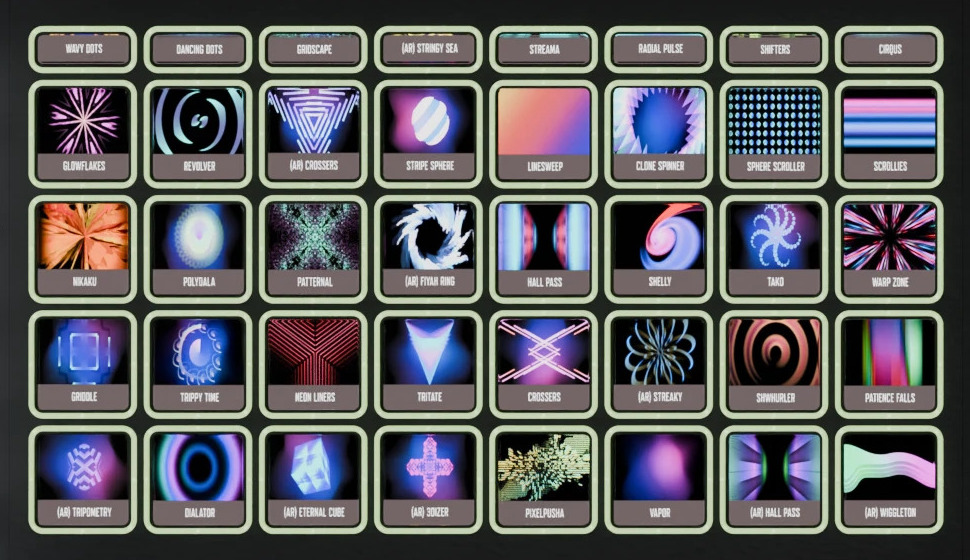
Button type |
Icon size (pixels) |
Pixel Format |
|---|---|---|
First row buttons |
188 x 60 |
RGB 8:8:8 |
Square buttons |
188 x 188 |
RGB 8:8:8 |
Concatenate the icon data for all buttons to build the full screen buffer.
The full screen buffer have a size of:
188 x 8 columns = 1504 pixels width.
60 x 1 row + 188 x 4 rows = 812 pixels height.
Example (JS) – Building the screen buffer:
XXX
The resulting buffer is then sent to the device with a bulk
transferOut call on the endpoint described above.