MIDI Protocol
All the physical controls of the Controller Deck (faders, knobs, buttons, pads and the TouchDeck grid) are reported to the host as standard USB MIDI events. The device also accepts MIDI messages sent by the host to control the buttons/knobs levels and their RGB backlight, or to configure the touchscreens widgets.
USB device identification
The MIDI interface is exposed on the main TouchDeck USB
device:
Field |
Value |
|---|---|
bcdUSB |
2.00 High Speed |
Vendor ID |
|
Product ID |
|
iManufacturer |
LambdaConcept |
iProduct |
TouchDeck |
USB Descriptor details …
Bus 001 Device 092: ID ffff:1234 LambdaConcept TouchDeck
Negotiated speed: High Speed (480Mbps)
Device Descriptor:
  bLength                18
  bDescriptorType         1
  bcdUSB               2.00
  bDeviceClass            0 [unknown]
  bDeviceSubClass         0 [unknown]
  bDeviceProtocol         0
  bMaxPacketSize0        64
  idVendor           0xffff LambdaConcept
  idProduct          0x1234 TouchDeck
  bcdDevice            1.05
  iManufacturer           1 LambdaConcept
  iProduct                2 TouchDeck
  iSerial                 3 00000000
  bNumConfigurations      1
  Configuration Descriptor:
    bLength                 9
    bDescriptorType         2
    wTotalLength       0x006c
    bNumInterfaces          2
    bConfigurationValue     1
    iConfiguration          0
    bmAttributes         0x80
      (Bus Powered)
    MaxPower              500mA
    Interface Descriptor:
      bLength                 9
      bDescriptorType         4
      bInterfaceNumber        0
      bAlternateSetting       0
      bNumEndpoints           2
      bInterfaceClass         1 Audio
      bInterfaceSubClass      3 MIDI Streaming
      bInterfaceProtocol      0
      iInterface              0
      MIDIStreaming Interface Descriptor:
        bLength                 7
        bDescriptorType        36
        bDescriptorSubtype      1 (HEADER)
        bcdADC               1.00
        wTotalLength       0x0043
      MIDIStreaming Interface Descriptor:
        bLength                 6
        bDescriptorType        36
        bDescriptorSubtype      2 (MIDI_IN_JACK)
        bJackType               1 Embedded
        bJackID                 1
        iJack                   4 Grid
      MIDIStreaming Interface Descriptor:
        bLength                 6
        bDescriptorType        36
        bDescriptorSubtype      2 (MIDI_IN_JACK)
        bJackType               1 Embedded
        bJackID                 3
        iJack                   5 Controller
      MIDIStreaming Interface Descriptor:
        bLength                 9
        bDescriptorType        36
        bDescriptorSubtype      3 (MIDI_OUT_JACK)
        bJackType               1 Embedded
        bJackID                 2
        bNrInputPins            1
        baSourceID( 0)          1
        BaSourcePin( 0)         1
        iJack                   4 Grid
      MIDIStreaming Interface Descriptor:
        bLength                 9
        bDescriptorType        36
        bDescriptorSubtype      3 (MIDI_OUT_JACK)
        bJackType               1 Embedded
        bJackID                 4
        bNrInputPins            1
        baSourceID( 0)          3
        BaSourcePin( 0)         1
        iJack                   5 Controller
      Endpoint Descriptor:
        bLength                 9
        bDescriptorType         5
        bEndpointAddress     0x01  EP 1 OUT
        bmAttributes            2
          Transfer Type            Bulk
          Synch Type               None
          Usage Type               Data
        wMaxPacketSize     0x0200  1x 512 bytes
        bInterval               0
        bRefresh                0
        bSynchAddress           0
        MIDIStreaming Endpoint Descriptor:
          bLength                 6
          bDescriptorType        37
          bDescriptorSubtype      1 (Invalid)
          bNumEmbMIDIJack         2
          baAssocJackID( 0)       1
          baAssocJackID( 1)       3
      Endpoint Descriptor:
        bLength                 9
        bDescriptorType         5
        bEndpointAddress     0x81  EP 1 IN
        bmAttributes            2
          Transfer Type            Bulk
          Synch Type               None
          Usage Type               Data
        wMaxPacketSize     0x0200  1x 512 bytes
        bInterval               0
        bRefresh                0
        bSynchAddress           0
        MIDIStreaming Endpoint Descriptor:
          bLength                 6
          bDescriptorType        37
          bDescriptorSubtype      1 (Invalid)
          bNumEmbMIDIJack         2
          baAssocJackID( 0)       2
          baAssocJackID( 1)       4
    Interface Descriptor:
      [... Custom bulk interface ...]
USB MIDI interface
The Controller Deck enumerates as a standard USB Audio Class 1.0 MIDI streaming interface (Interface 0), exposing two independent MIDI jacks:
bInterfaceNumber |
bNumEndpoints |
bInterfaceClass |
bInterfaceSubClass |
bInterfaceProtocol |
|---|---|---|---|---|
0 |
2 |
Audio |
MIDI Streaming |
0 |
This interface offers one bidirectional endpoint for MIDI communication with the host.
Endpoint |
Direction |
Purpose |
|---|---|---|
1 |
IN/OUT |
MIDI Streaming |
Jack index |
Name |
Content |
|---|---|---|
0 |
TouchDeck Grid |
Events and LED control for the 40-button TouchDeck grid. |
1 |
TouchDeck Controller |
Events and LED control for every other control: faders, knobs, A/B - B/S buttons, pad buttons, control buttons and the widgets touchscreens (SysEx). |
Manufacturer name reported by the device: LambdaConcept.
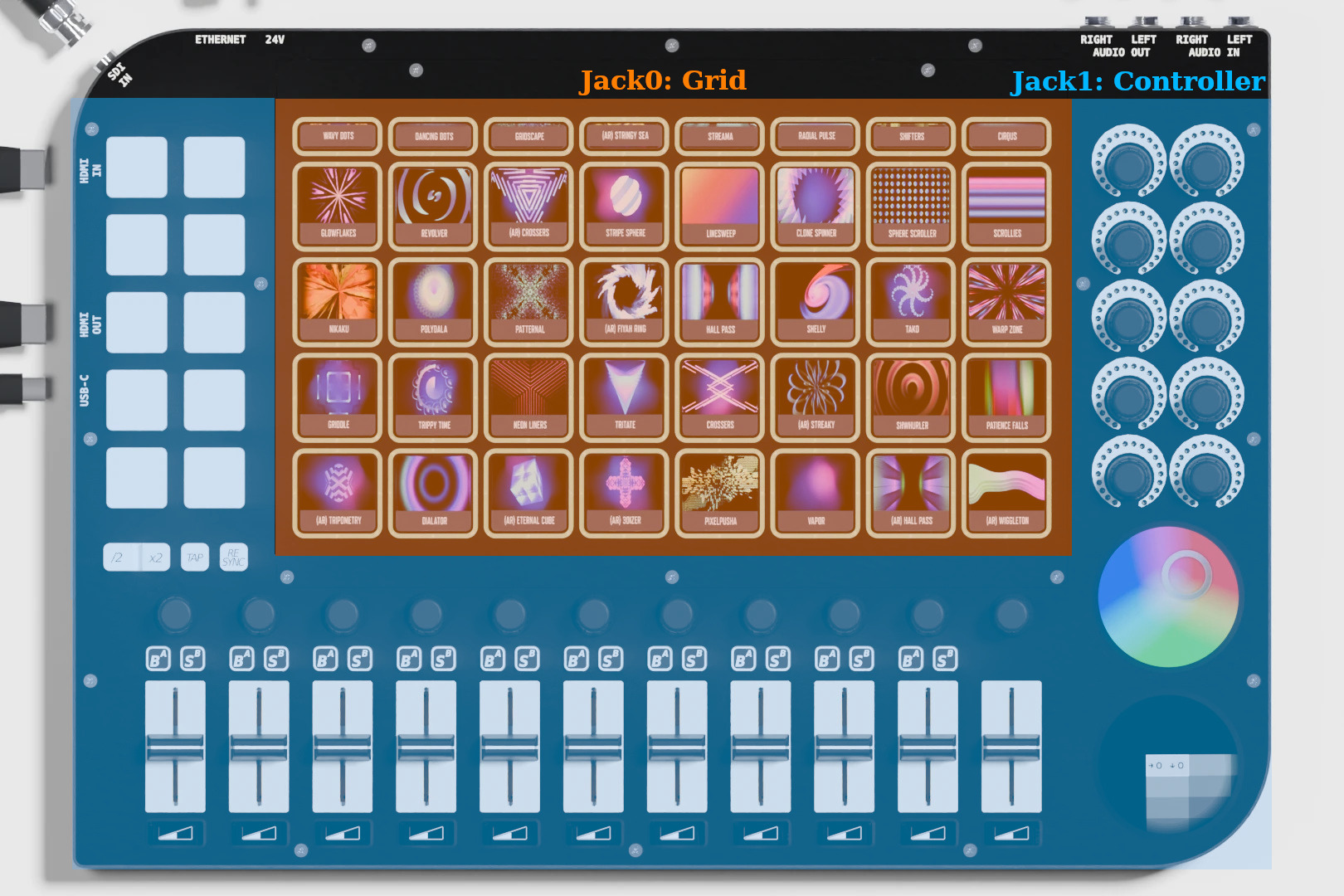
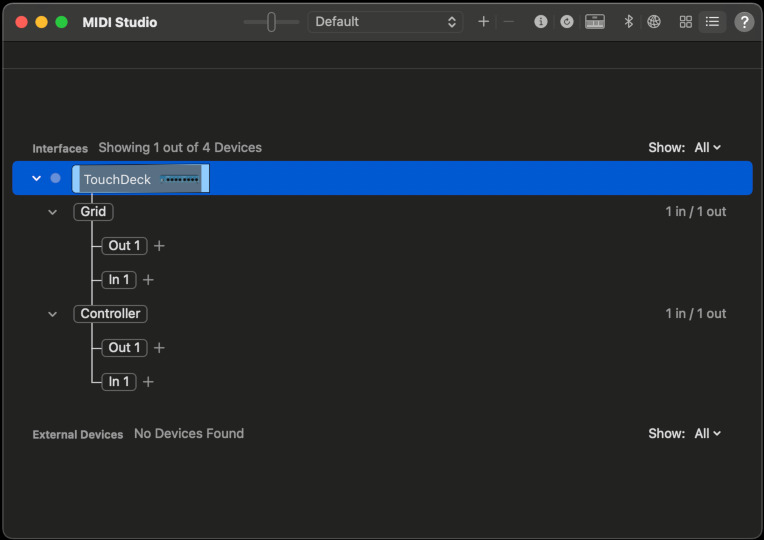
View MIDI Devices
USB-MIDI packet format
Every event, in either direction, is carried using the standard 4-byte USB-MIDI packet format:
Byte number |
00 |
01 |
02 |
03 |
|---|---|---|---|---|
Description |
Cable Number | Code Index Number (CIN) |
MIDI status byte |
MIDI data byte 1 |
MIDI data byte 2 |
Cable Number: ( |
Message type | Channel |
Note |
Velocity / Value |
CIN |
Message |
|---|---|
0x8 |
Note Off |
0x9 |
Note On |
0xB |
Control Change |
0x4 |
SysEx starts or continues (3 data bytes follow) |
0x5 / 0x6 / 0x7 |
SysEx ends with 1 / 2 / 3 data bytes |
Control mapping
Every physical control group is mapped to a range of MIDI note numbers
or controller (CC) numbers, all on channel 0. Groups that have a
backlight also report a led_channel, which is the MIDI channel to
use when sending LED color/mode messages back to the device (see
LED color control below).
Control |
Jack |
Message |
Range |
LED channel |
|---|---|---|---|---|
TouchDeck grid (40 buttons) |
Grid (0) |
Note On / Note Off |
0-39 |
0 |
RGB knobs |
Controller (1) |
Control Change |
0-9 |
1 |
Knobs |
Controller (1) |
Control Change |
10-20 |
– |
Faders |
Controller (1) |
Control Change |
21-31 |
– |
A/B - B/S buttons |
Controller (1) |
Control Change |
32-51 |
1 |
Pad button + Control buttons (x2, /2, TAP, RESYNC) |
Controller (1) |
Control Change |
72-85 |
1 |
Touchscreens widgets |
Controller (1) |
Control Change |
86-127 |
– |
Event examples
The following examples show the raw 4-byte USB-MIDI packet produced by the device when a control is used.
Event |
Packet (hex) |
Description |
|---|---|---|
Grid button 5 pressed |
|
Cable 0 (Grid), Note On, channel 0, note 5, velocity 127 |
Grid button 5 released |
|
Cable 0 (Grid), Note Off, channel 0, note 5, velocity 0 |
RGB knob #0 ( |
|
Cable 1 (Controller), CC, channel 0, controller 0, value 64 |
Knob #0 ( |
|
Cable 1 (Controller), CC, channel 0, controller 10, value 100 |
Fader #0 ( |
|
Cable 1 (Controller), CC, channel 0, controller 21, value 127 |
A/B button ( |
|
Cable 1 (Controller), CC, channel 0, controller 32, value 127 |
Pad button ( |
|
Cable 1 (Controller), CC, channel 0, controller 72, value 127 |
|
|
Cable 1 (Controller), CC, channel 0, controller 86, value 127 |
LED color control
The RGB backlight of the TouchDeck grid buttons (grid), RGB knobs
(kla), A/B - B/S buttons (bsr) and pad buttons (bpa) is
controlled by sending a Note On message to the device, on the
led_channel given in the mapping table above.
Field |
Meaning |
|---|---|
Message |
Note On |
Note |
Button/knob index (0-39) |
Velocity bits [0:4] |
Palette color index (0-31) |
Velocity bits [5:6] |
Mode |
Mode value |
Mode |
|---|---|
0 |
SOLID |
1 |
BLINKING |
2 |
FADING |
3 |
TURNING |
The velocity byte is therefore computed as (mode << 5) | color_index.
32 colors palette
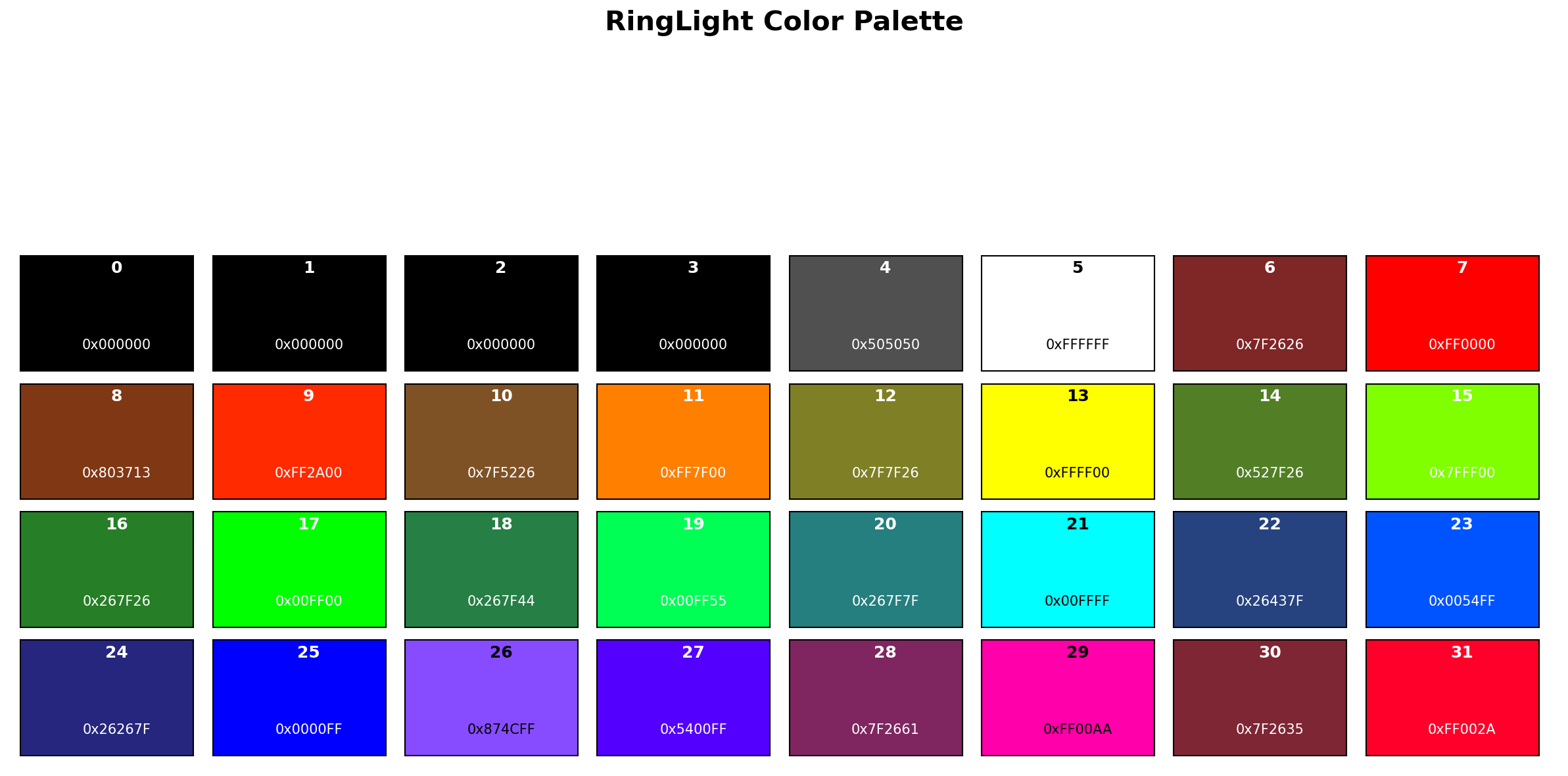
Idx |
RRGGBB |
Idx |
RRGGBB |
Idx |
RRGGBB |
|---|---|---|---|---|---|
0 |
|
1 |
|
2 |
|
3 |
|
4 |
|
5 |
|
6 |
|
7 |
|
8 |
|
9 |
|
10 |
|
11 |
|
12 |
|
13 |
|
14 |
|
15 |
|
16 |
|
17 |
|
18 |
|
19 |
|
20 |
|
21 |
|
22 |
|
23 |
|
24 |
|
25 |
|
26 |
|
27 |
|
28 |
|
29 |
|
30 |
|
31 |
|
LED example
Set grid button 5 to solid red (palette index 7, mode SOLID = 0):
velocity = (SOLID << 5) | 7 = (0 << 5) | 7 = 0x07

Packet: 09 90 05 07
         |  |  |  |
         |  |  |  +-- velocity: color index 7 (red), mode SOLID
         |  |  +----- note: button index 5
         |  +-------- Note On, channel 0
         +----------- Cable 0 (Grid), CIN 0x9 (Note On)
Set A/B button, relative index 0 within the bsr range, to fading
cyan (palette index 20, mode FADING = 2), on the bsr LED
channel (1):
velocity = (FADING << 5) | 20 = (2 << 5) | 20 = 0x54

Packet: 19 91 00 54
Pager control
This is the matrix representation with MIDI note indexes:

                                                Horizontal page scrolling:

Channel:      0   0   0   0   0   0   0   0            1   1   1  ..

Matrix:    +--------------------------------+
position   |  0   1   2   3   4   5   6   7 |          0   1  ..
           |  8   9  10  11  12  13  14  15 |          8   9  ..
           | 16  17  18  19  20  21  22  23 |   -->   16  17  ..
           | 24  25  26  27  28  29  30  31 |         24  25  ..
           | 32  33  34  35  36  37  38  39 |         32  33  ..
           +--------------------------------+

Vertical                   |
line scrolling:            v

             40  41  42  43  44  45  46  47
             ..
             ..  ..  ..  ..  ..  ..  ..  ..
             ..
            120 121 122 123 124 125 126 127
To set the current line of the TouchDeck grid:
Set the current line:
    mtype:      PROG_CHANGE (0xC)
    channel:    0
    note:       0-LINES_MAX_SCROLL      (new line index)
    value:      N/A

Where LINE_MAX_SCROLL = 11 (12 possible values)
Note
12 scroll positions + 4 lines = 16 lines in total
Set the current column:
    mtype:      PROG_CHANGE (0xC)
    channel:    1
    note:       0-COLUMNS_MAX_SCROLL    (new column index)
    value:      N/A

COLUMNS_MAX_SCROLL = 119 (120 possible values)
Note
120 scroll positions + 8 columns = 128 columns in total
Sending LED / MIDI messages via the control endpoint
If the standard MIDI interface is already claimed by other software,
the same 4-byte USB-MIDI packet can also be delivered to the device
through a vendor control transfer, “Set MIDI” (request 5), on
the control endpoint (see Icons Protocol for the full list of
vendor requests):
Field |
Value |
Computed from packet |
|---|---|---|
bRequest |
5 |
– |
wIndex |
|
Cable/CIN byte and status byte |
wValue |
|
Data byte 1 and data byte 2 |
Example, using the same “grid button 5 solid red” packet
(09 90 05 07) as above:
wIndex = (0x09 << 8) | 0x90 = 0x0990
wValue = (0x05 << 8) | 0x07 = 0x0507
async setCustomMIDI(device, midi32) {
    const value = (midi32[2] << 8) | midi32[3];
    const index = (midi32[0] << 8) | midi32[1];
    await device.controlTransferOut({
        requestType: "vendor",
        recipient: "device",
        request: 5,
        value: value,
        index: index,
    }, new Uint8Array(0));
}
Touchscreens widgets (SysEx)
The two round touchscreens are configured with SysEx messages sent on
the Controller jack (jack index 1). SysEx payloads longer than 3 bytes
are split across several USB-MIDI packets, using CIN 0x4 for the
bytes that start/continue the message and CIN 0x5/0x6/0x7
for the packet that ends it with 1, 2 or 3 bytes respectively.
Command |
SysEx (hex) |
Purpose |
|---|---|---|
|
|
Assign a widget (e.g. crossfader, color picker) to a touchscreen. |
|
|
Set the touchscreen backlight brightness. |
|
|
Mirror the touchscreen content. |
|
|
Restore factory settings for the touchscreen. |
Example – USB-MIDI packet breakdown for touchscreen_brightness
(F0 7D 01 7F F7, 5 bytes, sent on Cable 1):
Packet 1: 14 F0 7D 01   (CIN 0x4: SysEx starts/continues, 3 bytes: F0 7D 01)
Packet 2: 16 7F F7 00   (CIN 0x6: SysEx ends with 2 bytes: 7F F7, byte 3 unused)
Example – USB-MIDI packet breakdown for touchscreen_widget
(F0 7D 00 01 02 F7, 6 bytes, sent on Cable 1):
Packet 1: 14 F0 7D 00   (CIN 0x4: SysEx starts/continues, 3 bytes: F0 7D 00)
Packet 2: 17 01 02 F7   (CIN 0x7: SysEx ends with 3 bytes: 01 02 F7)